
Check a rig
A rig can check itself in three ways: that its model answers, that its agents are kept away from the judge, and that its judge gives known changes the verdicts they should get. Run the checks after you set a rig up, after a new version, and after you change its model. Giving a rig a model runs its Model route check by itself.
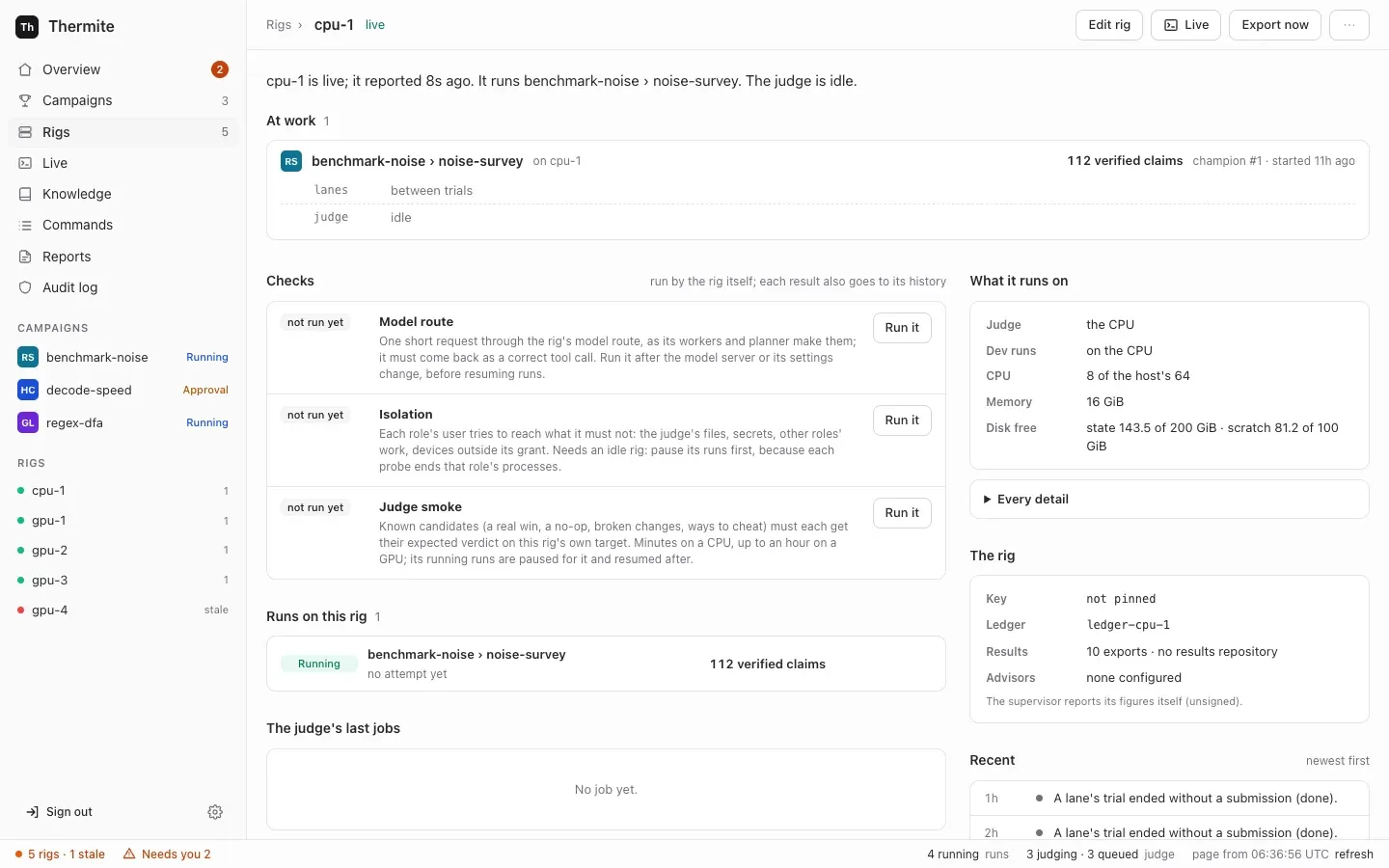
| Check | On the dashboard | What it tells you | How long |
|---|---|---|---|
| Model route | Model route | The rig’s model answers a request with a correct tool call, the way its agents use it | Seconds; at most 2 minutes |
| Isolation | Isolation | Each agent’s user is refused what it must not reach: the judge’s files, secrets, other agents’ work, devices outside its share | Seconds |
| Smoke | Judge smoke | The judge gives each change in a known set its expected verdict, on this rig’s own device | A few minutes on a CPU, up to an hour on a GPU |
A result reaches the dashboard with the rig’s next report, which comes every minute. The rig checks reference describes each check in full.
Before you start
Section titled “Before you start”-
The rig reports to control: on Rigs, in the dashboard’s sidebar on the left, it has the green chip Live.
-
For Isolation and Judge smoke, the rig must be idle: no trial open, and no judge job queued or running. Otherwise both refuse with
not now:. To get there, open the rig’s page, press Edit rig, switch Workers (agents) off and press Save changes. Running trials end on their own, and the judge works through its queue; the rig’s page then says “The judge is idle.” Turn the workers on again after the check. Judge smoke pauses the rig’s running runs while it works, and resumes them afterwards.A paused run’s queued judge jobs wait until it resumes, and they keep the rig busy (goal 061). Resume such a run while the workers are off, so that the judge can finish its jobs.
-
For Model route, the rig needs a model. See Connect a model provider.
Run a check on the dashboard
Section titled “Run a check on the dashboard”-
Open Rigs and choose the rig.
-
Find the Checks block. Each check shows not run yet, running, passed or failed, with when it ran.
-
Press Run it beside the check.
The page says that control sent the command, and that the rig does it in less than 10 seconds.
-
Wait, then press refresh in the status bar, the line along the bottom of every dashboard page. Dashboard pages do not reload by themselves.
The check shows passed or failed and one sentence about what it found. The same sentence goes to the rig’s history.
While Judge smoke runs, a campaign named rig-check-smoke-cpu- and eight letters and digits appears under Campaigns in the sidebar, with a run named check-smoke- and eight more. You can open it and watch the judge work. The run closes when the check is done. Later, the Campaigns page lists it under its Rig checks filter: it hides rig checks unless you ask for them.
Run a check from the command line or an agent
Section titled “Run a check from the command line or an agent”The dashboard sends a signed rig_check command. You can send the same command yourself.
From the command line, it needs the owner’s token. Run npx thermite in your Thermite folder, after npm ci and npm run build (see the command line). The examples use the owner’s token file of the local stack, .dev/secrets/control-admin-token. If you made an owner’s token of your own, use its file instead.
npx thermite command --control http://127.0.0.1:8800 --token-file .dev/secrets/control-admin-token \ --rig local-1 --kind rig_check --payload '{"check":"smoke"}'Use "model", "isolation" or "smoke" for check. The command prints the command’s id and "status":"pending". The result appears on the rig’s page and in its history, as above.
Over MCP, an agent, operator or owner token can send it with the issue_command tool, kind rig_check. See Let an agent run Thermite over MCP.
Read the result
Section titled “Read the result”| You see | It means | What to do |
|---|---|---|
| Model route passed: “model answered with a correct tool call in n s” | The model works for the agents | Nothing |
| Model route failed: “model failed the tool-call check: no answer in 120 s (is the model up?)” | The model server did not answer | Check the server and the provider’s base URL |
| Model route failed: ”… no tool call” | The model answered but did not call the tool | Choose a model that supports tool calling |
| Model route failed: “model failed the tool-call check in OpenCode:” (or “in Claude Code:” or “in Codex:”) and an error, such as “Rate limit exceeded. Please try again later.” | The error comes from the model’s provider. OpenCode’s free models are sometimes busy | Run the check again later, or choose another model |
| Model route failed: “no model route: …” | The rig has no model | Connect a model provider |
| Smoke passed: “smoke on smoke-cpu: all 12 candidates were judged as expected” | The judge works on this device | Nothing |
| Smoke failed: “k of n candidates were judged otherwise” | Some known change got the wrong verdict | Read the names it lists, then see Troubleshoot |
| Isolation passed: “isolation holds: every probe of n roles came out as it must (devices: …)” | Each agent’s user is kept from what it must not reach | Nothing |
| Isolation failed: “isolation does NOT hold (devices: …): role probe: ALLOWED; …” | A role reached something it must not (ALLOWED), or was refused something it needs (UNREADABLE, UNREACHABLE, WRONG GPUS) | Pause the rig’s runs and start none on it until the check passes. Look up each probe in the rig checks reference, then see Troubleshoot |
| Isolation failed: ”… the device setup failed” | The rig’s split of GPUs between the judge and the agents could not be set up | Pause the rig’s runs, and check its GPU settings: see Troubleshoot |
| “the check check is still running” | A check is still running on the rig, this one or another: a rig runs one check at a time | Wait for it, then run yours |
| “not now: …” | The rig is busy: it names the open trials and judge jobs, or a planner call that is running | Make the rig idle as in Before you start, or wait a few minutes for the planner call to end, then run the check again |
The rig’s harness container also runs the isolation check on its own each time it starts, before it does anything else, so a rig’s page usually already shows a recent result.