
Steer a run
You can steer a running campaign without touching its judge: pause or resume it, start its lanes afresh, and send its agents a message. To choose what the lanes try next, and to make rules for the planner, see Choose what a run tries next. Nothing you do here changes a verdict.
| Action | Where on the dashboard | What it does |
|---|---|---|
| Pause | The run’s header, Live’s header, or the run’s card under At work now | The agents’ running trials stop, and no new ones start. A stopped trial’s work that it had not submitted is thrown away; changes already submitted stay. Each stopped trial’s experiment goes back to the top of the run’s queue. The judge finishes the job it is on; the run’s other queued jobs wait until you resume |
| Resume | The run’s header; Live’s header, where a paused run is listed under Ended in the last day, marked paused; or the run’s row under Earlier runs | New trials start again, in the round the run was in: a trial that the pause stopped still counts in it. The planner plans the next round when this one’s trials are done. Agents resting after six failed trials in a row (limits and pacing) start again at once. Any other running run on that rig is paused: a rig runs one run at a time |
| Restart the lanes | ⋯ in the run’s header or in Live’s header, while a run with agents is running | Ends the running trials and the current round at once, with no question first. Their experiments go back to the top of the queue. The planner plans the next round straight away, and every lane starts again from the champion. Nothing the judge decided is lost |
| A message | The message box in Live, or Tell the planner on the Planner tab | Text for everyone working, one lane, the planner or the advisors. A message to everyone or to a lane can stay in force for every new trial. The planner makes rules from what you tell it |
| The experiment queue and the rules | The run’s Experiments and Planner tabs | See Choose what a run tries next |
A trial is one worker’s session in a lane: it ends when it submits a change, when its time runs out, or when it stops. Agents, lanes and the planner explains lanes, trials and the planner.
Before you start
Section titled “Before you start”- A run that is running or paused. A finished run can’t be resumed:
run <id> is closed. - The owner’s sign-in on the dashboard, the owner’s token for the command line, or an MCP token that may steer: see Who may do what.
Pause, resume or restart the lanes
Section titled “Pause, resume or restart the lanes”-
Open Campaigns in the sidebar. A running run has a card under At work now, on the Campaigns page and on its campaign’s page: press its name, shown as
<campaign> › <run>. A paused run is on its campaign’s page, under Earlier runs, which lists the paused and finished runs: press the campaign in the table under All campaigns, then the run. The run’s page opens. -
In the run’s header:
- To pause, press Pause. A small menu opens. It says
The lanes' running trials stop and no new ones start. Its jobs waiting for the judge wait until you resume, so the judge's time goes to running runs. Resume picks up from the same champion.You may say why in why (optional), up to 500 characters. Press Pause the run. - To resume a paused run, press Resume.
- To restart the lanes, press ⋯, then Restart the lanes. The menu says what it does; the button sends the command at once. ⋯ shows only while the run is running, and never on a run without agents, such as a try: it has no lanes to restart. Live’s header, beside Pause, has the same ⋯.
The page says
Control sent the command to rig-1. The rig does it in less than 10 seconds. This page shows the result., with your rig’s name. - To pause, press Pause. A small menu opens. It says
-
A little later, press refresh in the status bar, the line along the bottom of the page. Once the rig has reported, within a minute, the line under the run’s name ends
· Pausedor· Running. A paused run readsPausedeven while a change or a decision waits for you: what waits shows under Needs you on the run’s Overview. The run’s History tab showsRun sort-speed-1 paused: checking the kit., with the reason you gave, orRun sort-speed-1 resumed., or, after a restart,You restarted the lanes: their trials ended, and every lane starts again from the champion.A trial that the pause or the restart stopped shows in History aslane-1's trial on loop-tiling ended without a submission (interrupted)., and its experiment’s return to the queue as, for example,Your experiment "…" went back in the queue: its trial was interrupted., orThe planner's experiment "…"for one the planner added. After Restart the lanes, the planner’s next round follows in History within a few minutes.
With why (optional) left empty, the reason is paused from the dashboard. The reason also shows in the run’s Now block, and under Why it stopped in the campaign’s Earlier runs.
Send the agents a message
Section titled “Send the agents a message”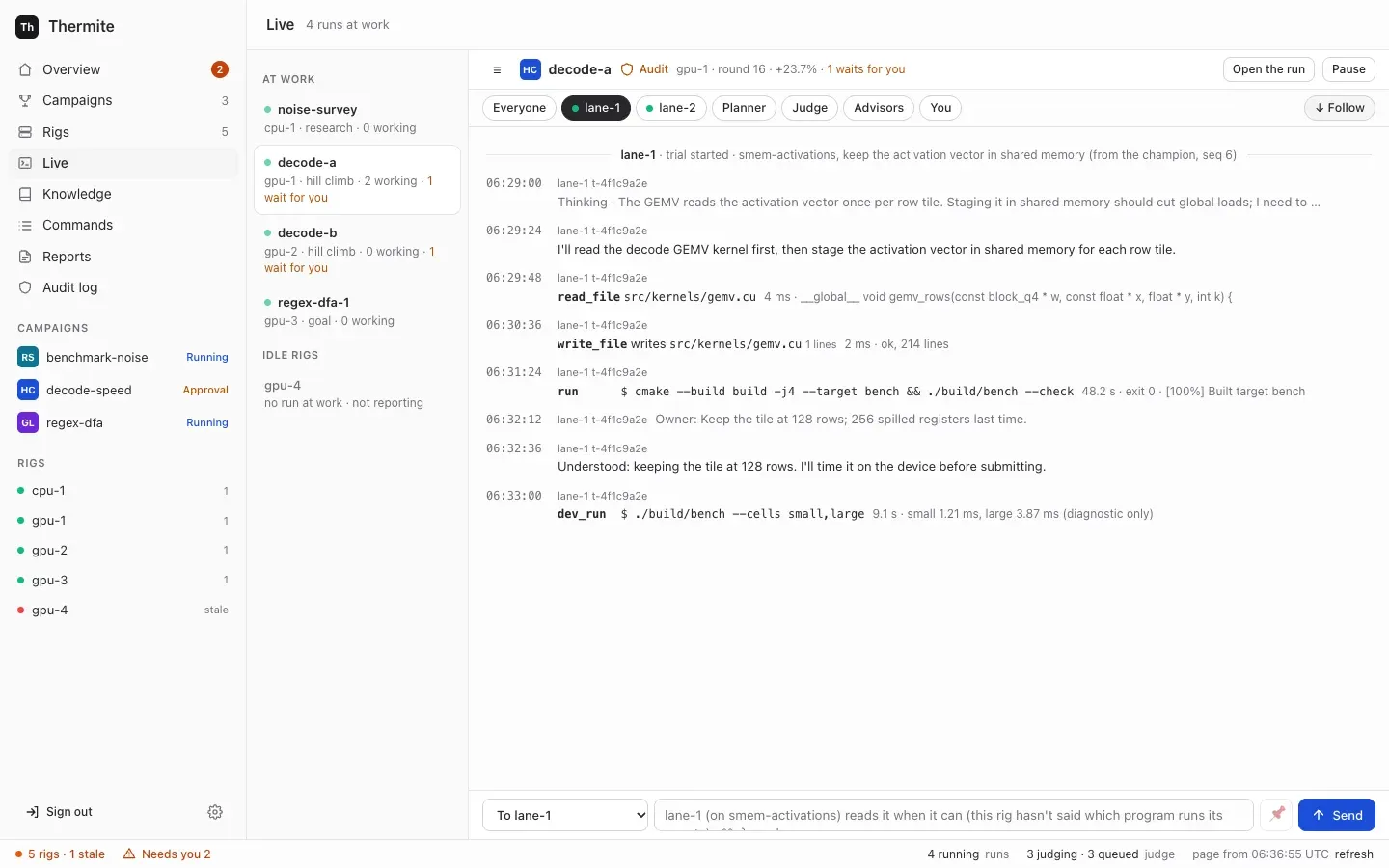
-
Press Message in the run’s header, or on the run’s card under At work now. Live opens on that run, with the cursor in the message box at the foot of the page. (Live in the sidebar opens the first run at work; the list on its left holds the others. With no run at work, it says
No run is at work. Pick one from the list to see its lines.: the list’s Ended in the last day holds the runs that paused or finished lately.) A run without agents, such as a try, has no Message button: it has no lanes or planner to read one. On its Live, you can still write to its advisors. -
In the To list, choose who gets it:
- To everyone working, the default: every lane at work, and the planner of a hill climb or goal run. The lanes at work are the contract’s lanes, or fewer when a
lane_countrule says so; - To lane-1, To lane-2 and so on: that lane’s running trial, or its next one;
- To the planner: at its next plan;
- under Advisors: To all advisors, To the teachers, To the auditor or To the review panel.
A recipient that would never read it is greyed out. Hover over it to read why:
- the planner, the auditor and the review panel of a research run, such as
A research run plans its rounds with a fixed method: it has no planner to message.; - everyone working, each lane and the planner of a run without agents, such as a try:
This run has no agents (the judge alone tries the kit), so nothing would read it.On such a run the box starts on To all advisors; - the review panel of a run with no goal it reviews:
This run has no goal the review panel reviews.; - any role that is switched off on the rig’s Edit rig page, such as
The auditor is off on this rig (Edit rig), so nothing would read it.; - an advisor that the rig’s supervisor has not set up, such as one switched on with no model:
This rig's supervisor has no teacher pair set up, so nothing would read it.To all advisors is greyed out when the supervisor has none set up, or when no advisor would read it, which startsNo advisor would read it.
A message to such a recipient is refused however it is sent, by control or else by the rig: see If a message doesn’t arrive.
Choosing a lane’s chip above the stream, or Planner or Advisors, also chooses that recipient. A lane that starts after the page has loaded gets its own chip when its first line arrives; its To entry comes with the next refresh.
- To everyone working, the default: every lane at work, and the planner of a hill climb or goal run. The lanes at work are the contract’s lanes, or fewer when a
-
Write the message, up to 4,000 characters. A message of only spaces doesn’t send: the box says
Write a message first.The box’s placeholder says when they will read it, then· ⌘↩ sends. It depends on the program the agents run in, such aslane-1 (on loop-tiling) reads it at its next stepin Pi,lane-1 (on loop-tiling) reads it when its current run ends, or in its next trialin OpenCode, Claude Code or Codex, orlane-1 reads it when it can (this rig hasn't said which program runs its agents). For everyone working, it saysEach agent reads it when its current run ends; the planner at its next plan, and for the planner,The planner reads it when it plans the next round. To keep a message to everyone working or to a lane in force for every new trial, tick 📌, which shows only for those two (see Keep a message in force). -
Press Send, or Ctrl+Enter (⌘+Enter on a Mac).
Within half a minute, once the rig has taken it, the stream shows your message, such as To lane-1: Look at the cache misses first., or To everyone working: and the text. When an agent reads it, a receipt follows: ✓ lane-1 read your message: “Look at the cache misses first.”, or ✓ planner read your message: …. A receipt that comes less than a minute after you sent the message may show first as a plain line, read the owner's message #3: …; it becomes the receipt once the rig’s next report reaches control. A message to one trial does the same. An advisor also answers, such as the teacher pair (teacher-a) answered you: and its answer. A line that only looks like one of these, such as one a worker printed, stays a plain line of that worker: Live trusts only the lines the rig’s harness signed. The filter You, above the stream, shows only your messages, their receipts, the answers, and the lines that say you removed a kept message. The judge takes no messages: it is code, and nothing anyone writes may change a measurement.
As they work, the agents keep field notes: short notes of an observation, a decision and why, a surprise, a question or a lesson. A note can be about your message. Live shows each note as it is written, such as noted (decision): …, and the run’s Journal tab lists them; there, a note about your message shows your message “…”.
You can also write to the planner of a hill climb or goal run from its run’s Planner tab: write in Tell the planner and press Send to the planner. There, typing : opens a list of the run’s directions to name one exactly. The tab says Sent to the rig. The planner reads it when it next gives out work; Commands shows whether the rig took it., and your message waits under the box until the planner’s next round, when its answer shows: the rules it made and the directions they name. With the planner switched off on Edit rig, the tab has no form, only a note that the planner reads no messages. From what you say, the planner can change the run’s experiment queue and make rules: see Make a rule: tell the planner.
When each agent reads it
Section titled “When each agent reads it”A receipt means the agent has the text. For a message in a new trial’s brief, that is once the trial’s agent is at work: its first line, or its first turn or tokens. A trial that fails before then leaves the message for the lane’s next trial. Each reader reads a message once, except a message kept in force, which each new trial reads again.
| Reader | When it reads your message |
|---|---|
| A worker in Pi | At its next step, before its next model call |
| A worker in OpenCode, Claude Code or Codex | When the model stops by itself without submitting, which the placeholder calls the end of its current run: the rig then continues the session with your message. That can take many minutes. If the trial submits or ends first, the lane’s next trial reads it at its start |
| A worker that has submitted, or a lane with no trial running | In the brief of the lane’s next trial, once its agent is at work |
| The planner | At its next plan that uses its model’s answer. When its model can’t be reached, or code refuses the model’s plan on both tries, the fixed rules plan the round and the message waits for the next plan: History then says (by the fixed rules: the model gave no usable plan, because …), and no receipt comes yet |
| The teacher pair | While the run is running, in a review round of the teachers’ own (not the planner’s round) that starts at once, after any review round already under way. For a paused run, the message waits until it runs again. If someone set the advisors a daily spending limit and it is reached, the message waits for the first review round after midnight UTC, and Live says so once |
| The auditor, the review panel | With their next audit or review, once it is posted: if it fails, the next try reads the message again. An audit or review comes only when the judge holds a change for audit, or a goal waits for review |
Supervision says how the advisors read and answer your messages.
Keep a message in force
Section titled “Keep a message in force”A message kept in force goes into the brief of every new trial until you remove it: every lane’s new trials, for a message to everyone working, or one lane’s, for a message to that lane. Only those two can be kept, so 📌 shows only for them.
- In the stream, a kept message shows
📌 kept in force, and each trial that reads it shows✓ lane-1 read your message (in force): …. - 📌 2 kept, above the stream, lists your kept messages, such as To everyone: and the text, under
Every new trial gets these, until you remove them.It shows once the rig’s report with the message reaches control, within a minute. To end one, press Remove beside it. The page says that control sent the command; within seconds the stream says📌 You removed your kept message: “…”. New trials no longer get it., under You and, for a message to a lane, under that lane’s filter. After the rig’s next report the message leaves the list. A trial that had already read it keeps it; new trials don’t get it.
Write to one trial
Section titled “Write to one trial”Live writes to a lane, not to one trial. To write to one trial, send message_agent with "to": "trial:<id>" from the command line, the REST API or MCP. Live shows the start of a trial’s id beside its lines, such as t-4f1c9a2e. The whole id is in the run’s at_work, from the MCP tool run_queue, or from the REST API with the owner’s token:
curl -s -H "Authorization: Bearer $(cat .dev/secrets/control-admin-token)" \ http://127.0.0.1:8800/v1/rigs/local-1/viewIn its answer, find the run in runs: its at_work holds each lane’s trial, such as "lane-1": {"trial": "t-4f1c9a2e5b7d4c10", …}. If the trial ends before it reads the message, the lane’s next trial reads it, and is told so.
The rig’s own live view, Live on the rig’s page, has no message box: it says To message an agent, open its run's Live: and links each run.
If a message doesn’t arrive
Section titled “If a message doesn’t arrive”Control refuses a message with no words, or one that nothing would read, before it signs it, however you send it: from Live, the Planner tab, the command line, the REST API or MCP. Its reasons are the words Live shows on a greyed-out recipient:
Write a message first., for a message with no words, or only spaces;This run has no agents (the judge alone tries the kit), so nothing would read it., for everyone working, a lane, the planner or one trial of a run without agents, such as a try: write to its advisors, or start a run with agents;The planner is off on this rig (Edit rig), so nothing would read it., and the same words for the teacher pair, the auditor or the review panel when its switch is off;A research run plans its rounds with a fixed method: it has no planner to message.,A research run has no attempts to audit.andA research run has no conclusions to review.;This rig's supervisor has no auditor set up, so nothing would read it., with the teacher pair or the review panel in its place, for an advisor the rig’s supervisor hasn’t set up, such as one with no model;- for To all advisors,
This rig's supervisor has no advisors set up, so nothing would read it.when it has none, andNo advisor would read it.with each advisor’s reason when none of them would.
In Live and on the Planner tab, a strip above the box shows Not sent. and control’s reason at once. Over MCP, issue_command answers {"error":"…"} with the reason. The REST API and thermite command get an answer of 400 with {"error":"…"}. Nothing reaches Commands. Every refusal, from Live, the Planner tab, MCP, the REST API or thermite command, is in the Audit log, as refused.
Control knows which advisors a rig has set up only once the rig’s supervisor has reported them. Until then, it sends a message to an advisor that is switched on, and nothing reads it until the advisor has a model. See Configure advisors.
The rig refuses the messages that control can’t check, and says why, within seconds. Press refresh in Live: above the message box, a strip reads Not sent. The rig refused your last message: and the reason, such as run sort-speed-1 has 1 lane for a lane the run doesn’t have. It stays until you send that run a newer message. A refused message to the planner shows on the Planner tab too, above Tell the planner, as Not sent. The rig refused your last message to the planner: and the reason. Commands in the sidebar also has the rig’s refusal: the newest message agent row is failed, with the reason under Outcome. message_agent lists every reason the rig gives.
Steer from the command line
Section titled “Steer from the command line”thermite command sends the same commands, with the owner’s token. Run npx thermite in your Thermite folder, after npm ci and npm run build (see the command line). The examples use the owner’s token file of the local stack, .dev/secrets/control-admin-token. If you made an owner’s token of your own, use its file instead.
npx thermite command --control http://127.0.0.1:8800 --token-file .dev/secrets/control-admin-token \ --rig local-1 --kind pause_run --payload '{"run":"sort-speed-1","reason":"checking the kit"}'It prints the command’s id and "status":"pending". In each payload, run is the run’s name as the dashboard shows it, such as sort-speed-1. The payloads:
| Kind | Payload |
|---|---|
pause_run | {"run":"sort-speed-1","reason":"checking the kit"} |
resume_run | {"run":"sort-speed-1"} |
reset_workers (Restart the lanes) | {"run":"sort-speed-1"} |
redirect, added to the rules in force | {"run":"sort-speed-1","directives":[{"kind":"avoid","family":"loop-tiling","rationale":"three trials regressed"}],"replace":false} |
redirect, a direction in plain words or :name:, added to the rules in force | {"run":"sort-speed-1","directives":[{"kind":"try","family":":vector loads:","rationale":"twice the bandwidth"}],"replace":false} |
redirect, replacing the rules you sent before this way | {"run":"sort-speed-1","directives":[{"kind":"avoid","family":"loop-tiling","rationale":"three trials regressed"}]} |
drop_directive (Remove on a rule) | {"run":"sort-speed-1","id":7} |
message_agent | {"run":"sort-speed-1","to":"lane-2","text":"Look at the cache misses first."} |
message_agent, kept in force | {"run":"sort-speed-1","to":"all","text":"Keep the public API unchanged.","keep":true} |
unkeep_message | {"run":"sort-speed-1","message":3} |
The changes to the experiment queue, queue_add, queue_move, queue_edit, queue_drop and queue_accept, are in Choose what a run tries next.
A redirect takes up to 40 directives, each with a kind, a rationale, and, where the kind needs one, a family (its direction, in plain words or as :name:) or a value:
kind | What it does |
|---|---|
avoid | No lane is given that direction |
try | Puts the waiting experiments in that direction first when there is a choice. It adds none (Try on the dashboard) |
mandate | Every plan gives that direction a lane (Always on the dashboard) |
priority | Ranks a direction for the planner |
lane_count | value: how many lanes to plan, up to the contract’s lanes.count |
note | Free text for the planner |
- Without
"replace": false, a set replaces the rules sent earlier the same way, and only those. The command line and the REST API share one set. Over MCP, each token’s role has its own: the owner’s, the operator’s and the agent’s. The dashboard sends noredirect: its rules come from the planner, which adds them from your messages. Rules from elsewhere stay: remove them withdrop_directive. - Control sends each
familyas the direction’s name::Vector loads:goes asvector-loads. A direction the run doesn’t have yet is taken, and the planner designs it at its next round: see Directions. A research run takes only its task kinds. - A set that both avoids a direction and asks for it is refused:
the set both avoids and asks for <direction>. - A rule in words is refused:
bad redirect payload: directives.0: a rule no longer takes match: name its direction in family, in plain words or as :name:. So is afamilythat can’t be a direction’s name:… is not a direction's name: write it in letters, digits, spaces and dashes, such as shared memory tiling or :shared memory tiling:. - Only the planner sees rationales and notes; workers never do.
- Your directives come before any that the rig’s advisors or the planner set on the same
family. drop_directiveremoves one rule in force, whoever set it. Itsidis the rule’s number, fromrun_queue’srules. A rule that is not in force is refused:no rule 7 in force in run sort-speed-1. In a finished run,drop_directiveandredirectare both refused:run sort-speed-1 is closed: its queue and rules no longer change. Only you, or an operator, can set a removed rule again, with aredirect; the advisors, the planner and the agent’s token can’t: see Remove a rule.
A message_agent’s to is all (everyone working), planner, advisors (all of them), teachers, auditor, panel, lane-1 to lane-16, or trial: and a trial’s id. The text may be up to 4000 characters; control trims the spaces around it, and refuses a message nothing would read as above. "keep": true works only with all or a lane; with another to, control refuses it: bad message_agent payload: keep: only a message to everyone working (all) or to a lane can be kept in force.
The rig numbers each message, and unkeep_message takes that number as message. Find it in the rig’s answer to the message_agent command, such as {"accepted":true,"result":{"keep":true,"message":3,"readers":["lane-1","planner"],"to":"all"},"status":"applied"}: in the Outcome column on Commands, or in outcome from GET /v1/commands/<id>. readers says who will read it. After the rig’s next report the same answer shows with "kind" and "source" in place of "status".
Over MCP, an agent sends the same kinds and payloads with the issue_command tool, then follows them with command_status; which kinds each token may send is in Who may do what. The tool run_queue reads a run’s experiment queue, its rules, the planner’s hand-outs, and your messages with who read each one, the planner’s round that read it, the rules the planner made from it and the advisors’ answers. See Let an agent run Thermite over MCP.
Who may do what
Section titled “Who may do what”| Pause, resume, restart the lanes, add rules | Message the agents, remove a kept message | Change the experiment queue, remove a rule | |
|---|---|---|---|
| The owner: dashboard, REST API, command line, MCP | yes | yes | yes |
| The operator’s token over MCP | yes | yes | yes |
| The agent’s token over MCP | yes | no | no |
| The reader’s token | no | no | no |
Approving and rejecting changes is the owner’s alone: see Decide what waits for you. Tokens and roles has every role.